Bring the context.
Save a development focus, session feedback, reflection, or game review in the goalie’s workspace.
Ice hockey goalie development software
Practice feedback. Game reports. Video. One connected development record.
CreaseOS helps coaches, goalies, and families keep the work together—and know what to work on next.
No credit card to start a family or one-coach trial.
GOALIE WORKSPACE
CURRENT FOCUS
Stay balanced through the first save and find the puck before the next move.
Next ice time Monday · 6:30 PMSESSION FEEDBACK Coach
FILM ROOM Game review
Team practice / Private lessons / Game day / The next season
The work should carry forward
A team coach sees the game. A private coach works on the details. A family has the report and a clip.
Too often, that context stays in separate conversations. CreaseOS gives it a place to live around the goalie, with clear choices about who can see it.
Meet the new Film Room
Keep goalie game reports, video clips, and your coaching question together in one review.
AI reads the report. Your coach interprets the play.
Try Film Room with your 30-day trialA report. A clip. Context for your coach.
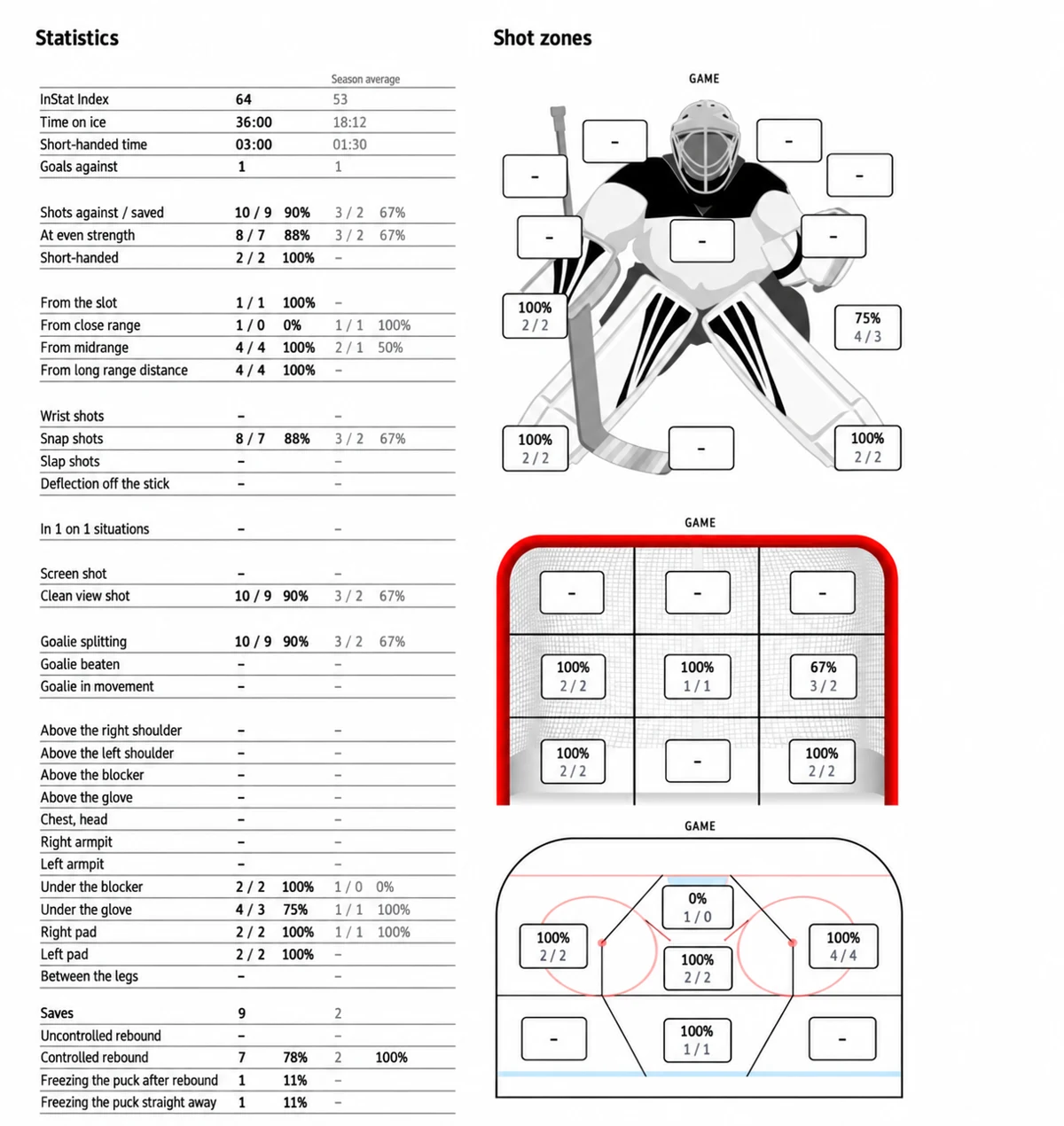
GOALIE REPORT
Game summary“Can we look at my position before the shot?”
Capture once. CreaseOS organizes it.
Save a development focus, session feedback, reflection, or game review in the goalie’s workspace.
Choose what to share with a connected family or coaching program. Keep personal notes private.
Prepare the next session with the recent feedback, plans, and shared information in view.
One sport. Different roles.
For goalie coaches
Keep your roster, session plans, observations, and Film Room reviews together. Pick up where the last session left off—even when the family has not joined.
Start as a coachFor goalies & families
Save a focus, reflect after ice, and bring game reports and clips to your coach. Your family’s development record stays with you as teams and seasons change.
Start as a familyFor directors & coaching teams
Assign coaches, organize ice times, and keep shared coaching work in one program workspace. Give your staff the context to build on each other’s work.
Explore coaching plansSee how it works
Choose a tour. Follow real CreaseOS screens with fictional goalies and coaches.
Quinn picks a focus and saves one small next step. A goalie’s development home works with or without a coach.
The family sets the direction.
Clear sharing. Clear boundaries.
Families choose the records they share with each connected coaching program. Coaches review what they share back. Personal coaching notes stay with their author.
Your goalie’s information does not automatically flow to every coach or program.
How privacy worksA plan for your starting point
Start a 30-day family or one-coach trial. No credit card required to start.
Goalies & families
For one goalie and their family.
$9.99 / month
Billed monthly.
Try your own workspace for 30 days without a credit card.
Start 30 days free → with Goalie PlusIndependent coaches
One coach seat. Your own workspace.
$34.99 / month
Billed monthly.
Try your own workspace for 30 days without a credit card.
Start 30 days free → with Coach Pro SoloCoaching teams
Up to 5 coach seats in one program workspace.
$89 / month
Billed monthly.
To add coaches, choose Team in Billing and add a payment method. Your remaining trial time is preserved.
Start with one coach → — add Team seats after checkout with a payment methodPrices in USD. Cancel anytime. Choose your plan and billing period in the app.
CreaseOS is ice hockey goalie development software for coaches, goalies, families, and coaching programs. It keeps development focuses, session plans, feedback, game reports, and video together so the next session can build on the last.
Yes. Both can add JPG, PNG, or WebP screenshots and PDF reports, upload MP4 clips, or save Hudl, InStat, and other video links in Film Room. Reports can be up to 3 MB each and MP4 clips up to 50 MB each, with up to three reports and three uploaded clips per review. Coaches can upload for a goalie without a family account.
AI can read supported goalie reports and draft game statistics. You check and correct the numbers before confirming the summary. CreaseOS does not automatically analyze the video or explain why a goal went in. The clip and report give you and your coach context for that conversation.
No. Families choose what to share with connected coaching programs. Coaches choose when to share a review with a connected family. Author-only coaching notes remain private. Other programs do not automatically receive your records.
Yes. Coaches can organize goalies, plans, notes, reports, and clips without requiring families to join. Families can keep their own development focus, schedule, reflections, and Film Room without a coach connection. Connect when you are ready to share.
Start a family or one-coach trial with no credit card required. To add coaching staff, choose Coach Pro Team in Billing and add a payment method at checkout. Your remaining trial time is preserved, and checkout shows when billing begins.
Access through that connection ends, including access through old links. Each owner keeps their own records. Other program connections are handled separately.
No. A parent, guardian, or adult goalie aged 18 or older creates the account. Goalies under 18 do not need a separate email address.
Start with your next ice time
Add your goalie. Save one focus. Bring the next report or clip.
30 days free · No card to start.
Additional Team seats require a payment method.